Ecommerce Website Redesign: A Complete Guide to Cost, Process & Checklist
A successful ecommerce website redesign starts with understanding where shoppers get stuck. This guide breaks down cost factors, the redesign process, and practical improvements to navigation, product pages, and checkout—with a checklist to help you plan your project and measure results.September 15, 2026

Table of contents
Quick answer: An ecommerce website redesign is the structural overhaul of how a store presents products, guides shoppers, and processes purchases — not simply a visual refresh. Cost varies by scope, platform, and whether the project covers design only, design plus development, or a full replatforming. A well-run redesign follows ten phases from discovery through post-launch monitoring, aims to protect existing search visibility, and is evaluated against defined metrics rather than aesthetics alone.
Ecommerce owners tend to start redesign conversations with the wrong question: “How do we make the site look more modern?” instead of “Where are shoppers dropping off, and why?” A website redesign is a design project. A conversion improvement is a business outcome. The two overlap, but treating them as identical can mean a redesign launches to compliments and little measurable change in revenue.
This guide covers what an ecommerce website redesign actually involves, when it’s worth pursuing, what it tends to cost, and how to run the process from first audit to post-launch monitoring — whether you’re on Shopify, WooCommerce, or evaluating a redesign agency.
What Is an Ecommerce Website Redesign?
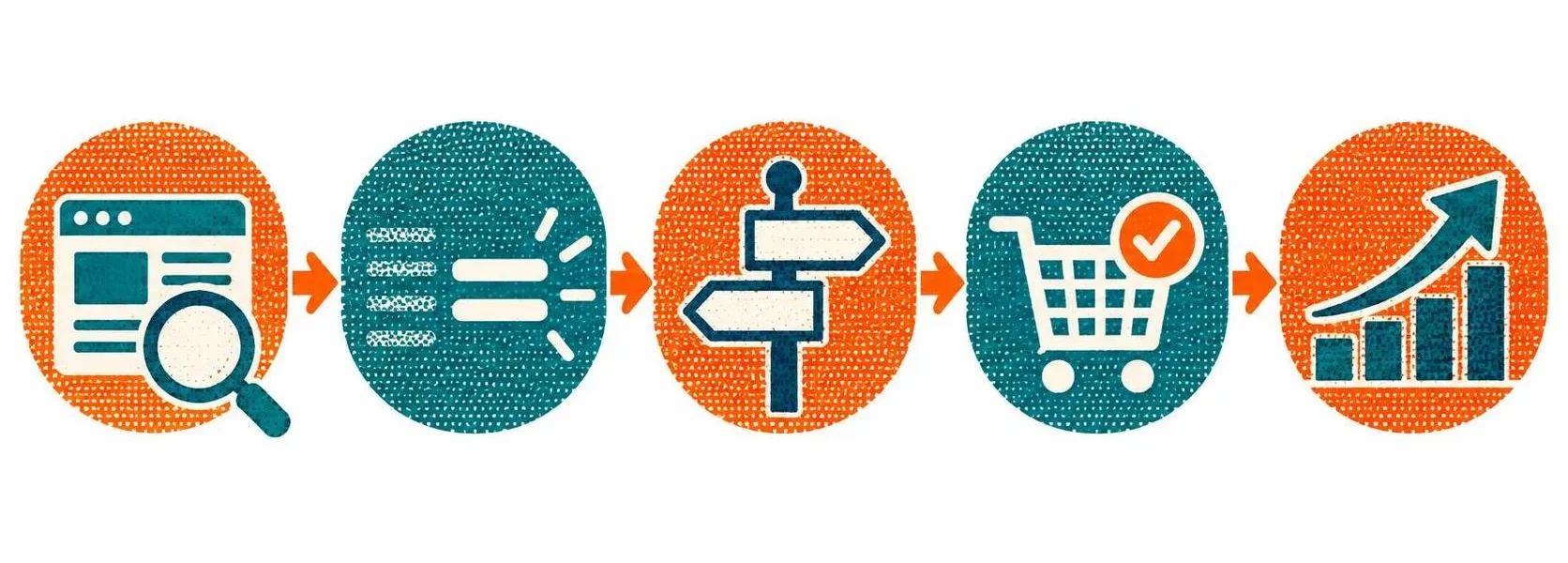
An ecommerce website redesign restructures how a store presents products, guides shoppers through the buying journey, and processes purchases. It typically touches information architecture, product page structure, checkout flow, and mobile usability — not just colors, fonts, or photography.
The term gets used loosely. Some teams mean a full rebuild; others mean a new theme; others mean fixing one broken checkout step. Defining which you actually need before scoping anything will save you time, money, and misaligned expectations.
A useful way to think about the full ecommerce shopping journey — and what a redesign should support — is the path from Find → Understand → Trust → Decide → Buy: Can shoppers find the right products? Do they quickly understand what they’re looking at? Do they feel confident enough to proceed? Can they make a decision? And can they complete checkout without unnecessary friction? A sound redesign addresses each of these stages, not just the visual layer.
An ecommerce UX redesign and an ecommerce UI redesign are related but distinct. UX addresses structure, flow, and usability — how shoppers move from browsing to buying. UI refers to visual styling — layout, color, typography. A redesign aimed at improving store performance requires both, with UX decisions made first.
When Should You Redesign Your Ecommerce Website?
A redesign is worth pursuing when problems are structural rather than cosmetic. Common signals include:
- Conversion rate has stalled despite steady or growing traffic.
- Mobile bounce rate differs meaningfully from desktop — a signal worth investigating alongside session recordings or funnel data, not proof of poor design on its own.
- Cart abandonment is high, and support tickets repeatedly mention checkout confusion.
- The product catalog has outgrown the navigation, making categories and filters feel cluttered or incomplete.
- The brand has evolved, but the site still reflects an earlier version of the business.
- Site speed and accumulated technical debt are compounding usability problems that smaller fixes can’t resolve.
If the issue is narrower — one underperforming product template, for example — targeted optimization is often a better starting point. There’s no fixed rule that automatically makes something a redesign versus an optimization project; the right call depends on how contained the friction is and how confident you are in the diagnosis. That’s why a UX audit should come before committing to either path.
Ecommerce Redesign vs. Optimization vs. Replatforming
These three paths carry very different scopes, timelines, and budgets.
Targeted optimization addresses friction contained to one or two page types while leaving the rest of the site intact.
Full storefront redesign restructures information architecture, product pages, checkout, and mobile usability together — without changing the underlying platform. This applies when friction spans multiple parts of the shopping journey.
Redesign with replatforming combines a full redesign with a migration to a new ecommerce platform. This is appropriate only when the current platform has hit a genuine capability limit, not simply because a competitor uses a different tool.
If fixing the friction requires touching several major page types and rethinking how they connect, it’s a redesign. If it’s contained to one interaction, optimization is typically faster, cheaper, and lower-risk. If your platform itself can’t support the experience you need regardless of design quality, replatforming becomes part of the conversation.
How Much Does Ecommerce Website Redesign Cost?

Ecommerce redesign cost is driven primarily by scope and complexity, not by whether the final visual direction is bold or minimal. The factors that most consistently affect budget include:
- Number of page templates — homepage, category, product, cart, checkout, and any custom page types
- Catalog size and complexity — uniform SKUs use one product template; complex catalogs with many variants, comparisons, or custom configurations may need several
- UX research depth — basic analytics review versus full customer interviews, session recordings, and usability testing
- Shopping flow complexity — a single straightforward purchase path costs less to design than multiple user flows, B2B quoting, or multi-step bundles
- Design system requirements — whether you need a scalable component library built from scratch or can build on an existing brand identity
- Platform — Shopify, WooCommerce, Magento, and others each carry different development realities that affect how design decisions translate to a working storefront
- Third-party integrations — reviews platforms, loyalty programs, ERP connections, and similar tools affect both design and development effort
- Custom functionality — non-standard features that need to be designed and built beyond the platform’s defaults
- Development scope — design-only work produces wireframes, UI files, and handoff documentation; design plus development also includes the build, QA, and deployment, which is often the larger budget item
- Migration or replatforming — moving between platforms adds complexity, data migration, and SEO preservation effort beyond the design work itself
The design-only vs. design-plus-development distinction matters
A design-only engagement produces the UX strategy, wireframes, high-fidelity UI designs, and a design system — assets a development team then builds. A design-plus-development engagement covers the full implementation through a live storefront. These are meaningfully different scopes, and quotes should make this distinction clear.
What Convex’s ecommerce UX & UI design includes
Convex’s ecommerce UX & UI design service starts from $2,000 and is typically delivered in 4–6 weeks, with the final scope depending on the complexity of the store and shopping experience. This is Convex’s starting price for the UX and UI design phase — it is separate from any development, integration, or replatforming work your project may require.
That starting price includes:
- Shopper research and persona definition
- Shopping flow and information architecture
- Wireframes and low-fidelity layouts
- Mobile-first responsive design
- Trust and conversion-focused UX
- Scalable design system
- Interactive prototype
- Figma source files
- Developer handoff documentation
- Unlimited revisions within scope
- Post-handoff support
Because pricing depends heavily on scope, don’t rely on general benchmarks when evaluating options. Request itemized quotes from any agency you consider, and compare design-only scope against design-plus-development line by line.
Project type comparison
|
Project Type |
Typical Scope |
Best Fit For |
|---|---|---|
|
Targeted optimization |
One or two page types (e.g., checkout or a product template) |
Stores with a specific, known friction point |
|
Full storefront redesign |
Full theme redesign within existing platform constraints |
Stores needing a modernized experience without migrating platforms |
|
Full UX & UI redesign |
Complete information architecture, UX strategy, and interface redesign |
Stores with structural navigation, product page, or checkout issues |
|
Redesign with replatforming |
Full redesign combined with a platform migration |
Stores that have outgrown their current platform’s capabilities |
The Ecommerce Redesign Process, Step by Step

A well-run redesign generally follows ten phases. Skipping ahead to visual design before validating the UX strategy is one of the most common reasons projects underperform after launch.
- Discovery and stakeholder alignment. Clarify business goals, budget, platform constraints, and who needs to sign off at each stage.
- UX audit and research. Review analytics and funnel data, heatmaps or session recordings if available, current navigation structure, product page content, checkout flow, page speed, and initial accessibility considerations. A UX audit answers the core question any ecommerce UX design project should start from: where is the shopping experience losing people, and why?
- Define success metrics. Before any design work begins, agree on the specific numbers — conversion rate, cart abandonment, average order value, and others — that will indicate whether the redesign worked.
- Information architecture and UX strategy. Restructure navigation, categories, and the overall shopping journey based on audit findings, not assumptions.
- Wireframing key flows. Map out homepage-to-category, category-to-product, product-to-cart, and cart-to-checkout at a structural level before visual decisions enter the picture.
- High-fidelity UI design. Apply visual design — brand elements, imagery, typography — to the validated wireframes.
- Prototyping and validation. Test key flows with real users or stakeholders. Verify color contrast, keyboard navigation, and screen-reader compatibility here, not as a late-stage fix.
- Development and platform build. Implement the design within Shopify, WooCommerce, or another platform, including any required migration work.
- QA, accessibility, and SEO migration checks. Test across devices and browsers, confirm redirects and metadata are in place, and verify accessibility compliance before launch.
- Launch and post-launch monitoring. Compare live performance against the pre-launch baseline and continue refining — launch day is a starting point, not an endpoint.
The order matters more than the exact time each phase takes. Design, development, migration, testing, and launch all carry different timelines depending on catalog size, page count, and scope. No single universal estimate applies to every project.
A note on performance. Redesign decisions should also account for page performance — image optimization, third-party script load, plugin and app overhead, and mobile loading speed. Core Web Vitals (Largest Contentful Paint, Cumulative Layout Shift, Interaction to Next Paint) measure real-world loading performance, responsiveness, and visual stability, and they are part of the page-experience considerations that align with Google’s ranking systems. A visually improved storefront can still create a worse experience if the underlying implementation becomes significantly heavier or slower. Performance should be considered during design and validated during QA, not treated as a separate optimization effort later.
15 Ecommerce UX Improvements to Evaluate
These are UX changes worth evaluating during a redesign. None are guaranteed to improve conversion on their own — their value depends on whether they address a specific friction point your audit uncovered. Each entry covers the problem it addresses, evidence that would justify prioritizing it, how to implement it, a concrete example, and how you’d measure the result.
Homepage

1. Lead with a clear value proposition, not just brand imagery.
Problem: Shoppers who can’t quickly tell what you sell may leave before scrolling further. Evidence to look for: high homepage bounce rate with low scroll depth in analytics. Implementation: a concise headline and supporting line above the fold that states what you sell and your key differentiator. Example: a skincare brand replacing a lifestyle photo hero with “Dermatologist-formulated skincare for sensitive skin” plus a product shot. Metric: homepage-to-category click-through rate.
2. Surface bestsellers or category entry points early.
Problem: Shoppers who don’t know where to start may bounce rather than search. Evidence to look for: low click-through from the homepage to any category or product page. Implementation: a bestsellers or “shop by need” module near the top of the page. Example: a homeware store adding a “Most Loved” carousel above the fold. Metric: homepage exit rate and downstream product views.
3. Reduce decision fatigue by limiting competing calls-to-action.
Problem: Too many equally weighted CTAs on the first screen can make the next step unclear. Evidence to look for: heatmap data showing scattered, low-intensity clicks across multiple buttons. Implementation: one primary CTA per screen, with secondary actions visually subordinate. Example: consolidating “Shop New Arrivals,” “Shop Sale,” and “Shop All” into a single primary path with others as text links. Metric: click concentration on the primary CTA.
Navigation & Discovery
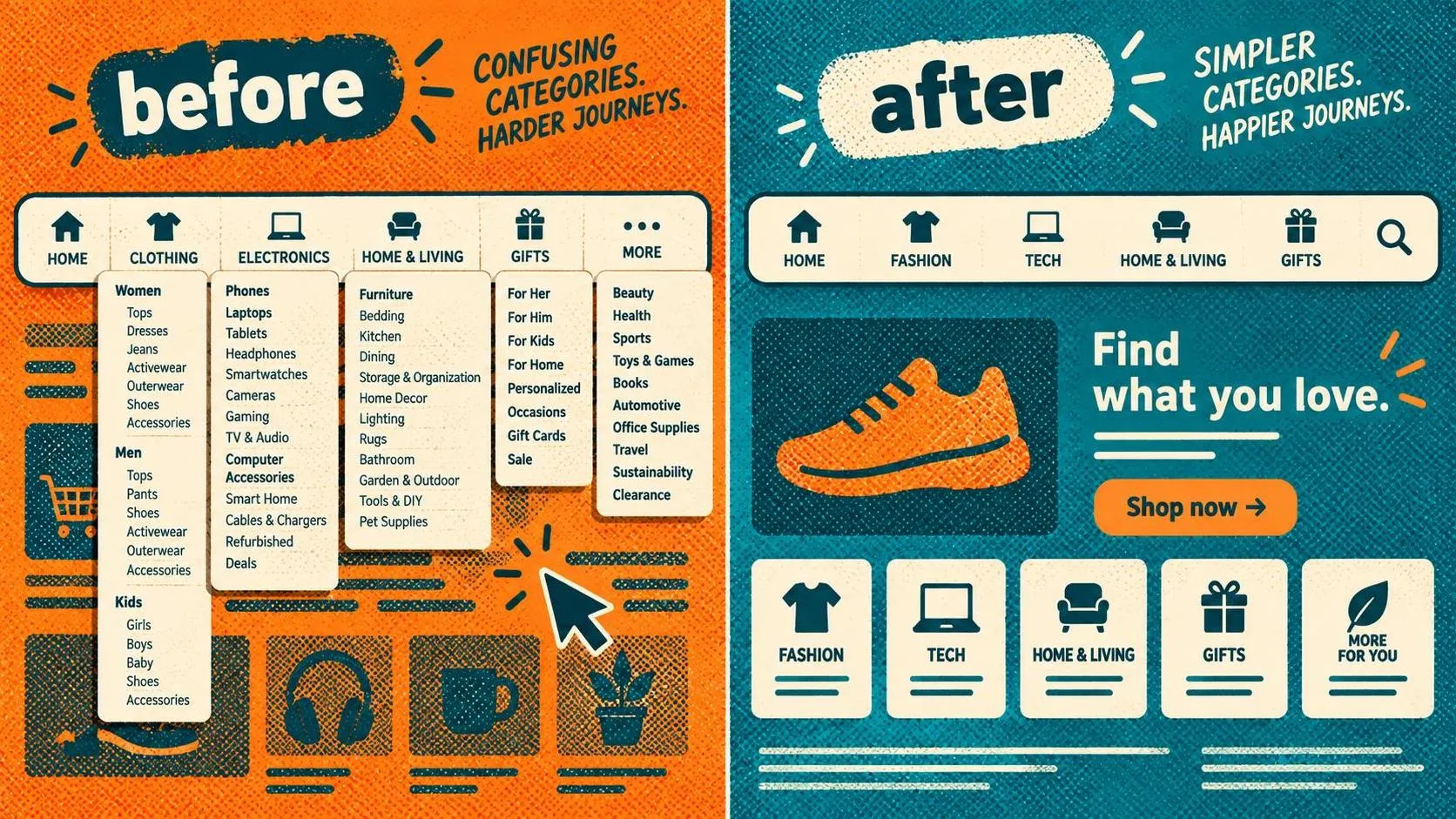
4. Simplify category structure around how customers shop.
Problem: Categories organized around internal inventory logic can create confusion for shoppers who think differently about products. Evidence to look for: frequent back-button use or repeated category switching in session recordings. Implementation: rebuild categories using customer research or search query data. Example: replacing “Collection 4” with “Work Bags” based on common search terms. Metric: navigation-to-product-page conversion rate.
5. Make search prominent and reliable.
Problem: A weak or hard-to-find search bar may push catalog-browsing shoppers elsewhere. Evidence to look for: high search abandonment or frequent zero-result searches. Implementation: enlarge the search field, add autocomplete, and tune it for typos and synonyms. Example: a search for “sneaker” also surfacing products tagged “trainer.” Metric: search-to-purchase conversion rate.
6. Add filtering that reflects real buying decisions.
Problem: Generic attribute tags rarely map to the criteria shoppers actually use to narrow choices. Evidence to look for: low filter usage despite a large catalog. Implementation: build filters around price, size, use case, or other decision-relevant attributes rather than internal taxonomy. Example: a furniture retailer adding a “room size” filter alongside material. Metric: filter usage rate and category-page conversion rate. You can see how these navigation and discovery principles come together in this ecommerce website case study from Convex.
Product Pages
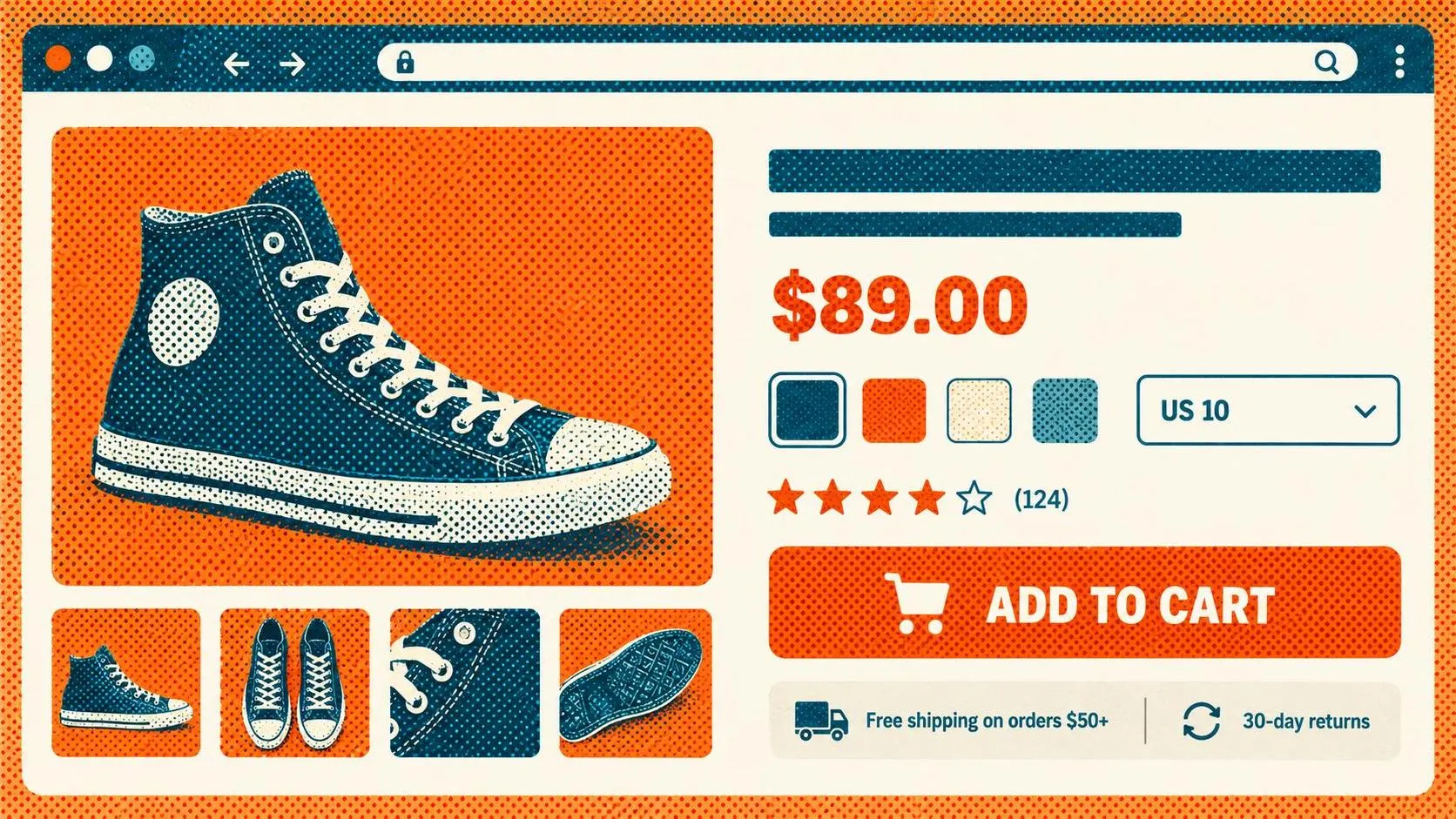
7. Lead with the information shoppers need to decide.
Problem: Pages heavy on imagery but thin on decision-relevant details can slow shoppers down or push them to search elsewhere. Evidence to look for: short average time on page combined with a low add-to-cart rate. Implementation: position price, key specs, and variant selection near the top alongside imagery. Example: moving fabric composition and fit notes above the fold on an apparel product page. Metric: add-to-cart rate.
8. Clarify shipping, returns, and sizing directly on the page.
Problem: Shoppers who have to navigate to a separate policy page may abandon rather than persist. Evidence to look for: support tickets or chat logs referencing shipping or return questions during the browsing phase. Implementation: a concise shipping and returns summary near the add-to-cart button. Example: “Free returns within 30 days” placed beside the size selector. Metric: product-page-to-cart conversion rate.
9. Place social proof near the purchase decision.
Problem: Reviews buried below the fold don’t reach shoppers at the moment they’re deciding. That said, prominent placement can also draw attention to limited review counts on newer products — context matters here. Evidence to look for: scroll-depth data showing most sessions don’t reach the review section. Implementation: surface a star rating and review count near the add-to-cart button; full reviews further down. Example: “4.6 stars, 210 reviews” displayed under the product title. Metric: add-to-cart rate on pages with sufficient review volume.
Checkout
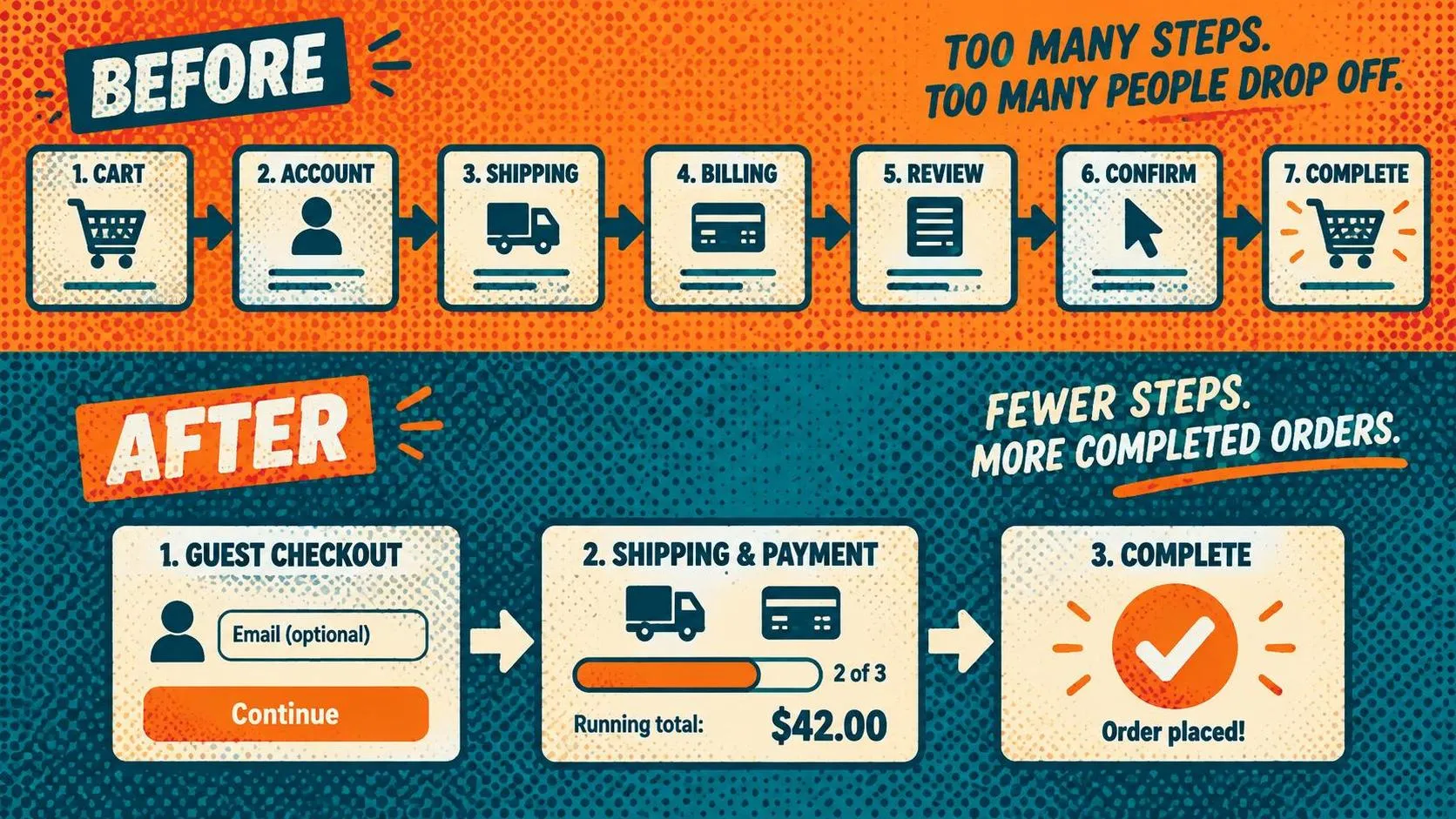
10. Reduce steps and form fields to only what’s necessary.
Problem: Lengthy forms and unnecessary steps can create friction at the point of highest purchase intent. Fewer steps isn’t universally better — some shoppers prefer a single detailed page over several short ones — so testing before committing to a specific structure is worthwhile. Evidence to look for: checkout drop-off data broken down by step. Implementation: audit every field and step; remove or consolidate anything not strictly required to complete the order. Example: combining shipping and billing address entry into one step when they match. Metric: checkout completion rate.
11. Offer guest checkout as the default path.
Problem: Requiring account creation before purchase is a commonly cited friction point, particularly for first-time buyers who haven’t yet committed to the purchase. Evidence to look for: elevated abandonment at an account-creation step. Implementation: default to guest checkout; offer account creation after the order is confirmed. Example: moving “Create an account” to the order confirmation page. Metric: checkout start-to-completion rate for new customers.
12. Show total cost and progress clearly before the final payment step.
Problem: Costs surfaced late in checkout — particularly shipping — can cause abandonment at the worst possible moment. Evidence to look for: drop-off concentrated at the shipping or payment step rather than earlier in the flow. Implementation: display a running total including estimated shipping from the cart onward. Example: a persistent order summary sidebar visible through every checkout step. Metric: cart-to-checkout-completion rate.
Mobile

13. Design mobile-first, not mobile-adapted.
Problem: Desktop-first experiences scaled down to mobile often carry interaction patterns that don’t translate well to a touchscreen. Evidence to look for: a notably lower mobile conversion rate, interpreted alongside session recordings rather than in isolation. Implementation: design core flows for a small viewport first, then adapt upward. Example: redesigning the mobile product gallery around swipe gestures instead of small tap targets. Metric: mobile conversion rate relative to desktop.
14. Make tap targets, filters, and forms usable with one hand.
Problem: Small buttons and cramped interactions can slow down shoppers, particularly during quick or on-the-go browsing. Evidence to look for: mis-tap patterns or form abandonment visible in session recordings. Implementation: increase tap target size and simplify filter and form interactions for natural thumb reach. Example: enlarging the add-to-cart button and positioning it within easy thumb reach on mobile product pages. Metric: mobile add-to-cart rate.
Trust
15. Build trust signals into the buying journey, not just a single page.
Problem: Trust accumulates — or erodes — through consistent signals across the full shopping experience. A security badge at checkout alone may not be sufficient if trust gaps exist earlier in the journey; its value also depends on whether trust was actually the barrier the shopper encountered. Evidence to look for: qualitative feedback or exit surveys citing hesitation, unclear contact information, or vague shipping timelines. Implementation: pair honest shipping estimates, visible contact information, and consistent product photography with relevant trust signals at cart and checkout. Example: displaying accurate delivery date ranges (“Arrives Thursday if ordered today”) rather than generic “ships fast” copy. Metric: checkout abandonment rate alongside qualitative signals.
Shopify and WooCommerce Considerations

Shopify. A Shopify website redesign is often worth pursuing when a store has outgrown its original theme structure — too many product variants for the collection template, a catalog that has grown beyond what the navigation was built for, or an app-heavy checkout experience that feels disjointed. Shopify is a managed platform, which means storefront customization options are defined by the theme system and extension boundaries set by Shopify.
Checkout customization specifically depends on plan. Stores on Basic or higher can use public apps built with Shopify Functions and the free Checkout Blocks app, though Checkout Blocks carries feature restrictions on non-Plus plans. Customizing the information, shipping, and payment pages through UI extensions is available only on Shopify Plus (Shopify Help Center, Customizing payment methods and delivery options at checkout). On non-Plus plans, redesign work generally concentrates on navigation, collection pages, and product templates — the areas where the most improvement is achievable within the platform’s structure.
WooCommerce. WooCommerce generally gives developers more direct control over the underlying WordPress/WooCommerce stack compared to Shopify’s more managed environment. This can make complex customizations more feasible, but it also means stores are more likely to accumulate technical inconsistency over time — particularly when multiple plugins for search, filtering, or checkout have been layered on without a cohesive design approach. A WooCommerce redesign typically needs to address inconsistent page templates, load times affected by plugin overhead, and checkout flows that were extended piecemeal rather than designed holistically. Greater technical flexibility doesn’t automatically produce a better shopping experience; the quality of the UX still depends on how the design is implemented, how the information architecture is structured, and how consistently the experience holds across devices and browsers.
For both platforms, performance deserves attention during a redesign. Shopify theme changes and WooCommerce plugin additions can both affect Core Web Vitals and page load speed — and a visually modernized storefront that loads more slowly than its predecessor may not deliver the experience improvement the redesign intended.
Ecommerce Website Redesign Checklist
Before you start
- Run a UX audit before writing a creative brief
- Define success metrics and a measurement period upfront
- Confirm whether the project is optimization, full storefront redesign, or replatforming
- Include accessibility requirements in the initial scope — not as a later addition
- Assess current page speed and Core Web Vitals as a performance baseline
During design and development
- Validate wireframes and key flows before moving to high-fidelity UI design
- Test color contrast, keyboard navigation, and screen-reader compatibility during prototyping
- Confirm checkout customization options against your specific platform and plan
- Build a design system for consistency across all templates
- Evaluate whether third-party scripts, apps, or plugins will affect load performance
SEO preservation (before, during, and after launch)
- Before launch: Determine whether URLs are actually changing — a visual redesign on the same platform, domain, and URL structure does not automatically require redirects (Google Search Central, How to Move a Site)
- Before launch: If URLs are changing, create a complete old-to-new URL mapping, including product images and other embedded content
- Before launch: Update canonical tags and any hreflang annotations to reference new URLs
- Launch day: Implement server-side permanent redirects (HTTP 301) for every changed URL, keeping redirect chains as short as possible
- Launch day: Submit an updated sitemap in Search Console and verify both old and new site properties
- Post-launch: Monitor the Page Indexing report in Search Console and track organic search performance for moved URLs
- Post-launch: Keep redirects live for at least a year; update internal and high-value external links to new URLs where possible
Launch and beyond
- QA across devices, browsers, and payment methods
- Confirm analytics tracking is correctly firing on the new site before comparing performance metrics
- Set a regular review cadence for post-launch monitoring and iteration
Illustrative Walkthrough
This is a hypothetical scenario to demonstrate how the redesign process might unfold. It is not a real client case study, and no performance figures are implied or guaranteed.
A mid-sized home goods store on Shopify has grown from 200 to over 2,000 SKUs over three years. The original theme’s category structure hasn’t kept pace, and the customer support team is fielding recurring questions about shipping timelines during checkout.
A UX audit might reveal that navigation still reflects supplier categories rather than how customers search for products, that shipping information is buried below the fold on product pages, and that mobile sessions show a higher cart exit rate than desktop. Based on those findings, the team would restructure navigation, move shipping details higher on product pages, and review the mobile cart flow — before touching visual design.
Wireframes for the new category structure and product template would be validated with a small group of existing customers, then built into high-fidelity design files, developed within the Shopify theme, and tested across devices and browsers. Redirects would be mapped for any changed URLs before launch. After launch, the team would track category-to-product conversion, cart-to-checkout completion, and mobile cart exit rate against the pre-redesign baseline for a defined measurement period before drawing conclusions.
How to Measure Redesign Results

A redesign without a measurement plan is difficult to evaluate. Before launch, define exactly how you’ll assess it:
- Conversion rate, with a clearly defined denominator (sessions or unique visitors — pick one and stay consistent) and segmented by device and traffic channel.
- Revenue per session, which accounts for shifts in order value alongside conversion rate.
- Average order value (AOV), to check whether any simplification affected upsell or cross-sell exposure.
- Cart abandonment versus checkout abandonment, tracked separately — they typically point to different friction and different fixes.
- Segmentation by device, channel, and customer type (new versus returning), since a redesign can help one segment while having little effect on another.
- Analytics validation before trusting any comparison — confirm that tracking fires correctly on every key page and event after launch.
- External factors — promotions, seasonality, pricing changes, inventory availability, and traffic mix shifts can all move numbers independently of the redesign. Note any that overlap with your measurement window.
- Causation versus correlation. A metric improving after launch doesn’t confirm the redesign was responsible. Look for consistent patterns across segments and rule out concurrent changes before attributing the shift to the design work.
- Measurement period based on traffic volume. Higher-traffic stores may reach actionable conclusions in a few weeks; lower-traffic stores may need a longer window, or may need to rely more on qualitative signals like usability testing, customer interviews, and session recordings.
How to Choose an Ecommerce Redesign Agency
Evaluate agencies on process and accountability, not just how the portfolio looks. Useful questions to ask any ecommerce UX/UI design partner:
- What platform experience do you have (Shopify, WooCommerce, other), and what specific constraints have you encountered on past projects?
- What research methods do you use during the audit phase, and can we see an example of the output?
- Is this engagement design-only, or does it include implementation and development?
- Who handles SEO migration — URL mapping, redirects, and post-launch monitoring?
- How is accessibility addressed during design and verified during QA?
- What’s included in the quoted price, what’s explicitly excluded, and how are change requests handled?
- What deliverables do we own at the end of the project, including source files and the design system?
- What support is available at and after launch?
- How will we jointly measure whether the redesign achieved its goals?
An agency built for large catalogs may not be the right fit for a small business, and vice versa — look for process depth and platform experience that matches your actual scope. Some agencies, including Convex, offer an initial UX audit as a scoping step before a full engagement. Treat it as a useful starting point for understanding the problem, not a substitute for the questions above.
Frequently Asked Questions

When should you redesign your ecommerce website?
When problems are structural — stalled conversion despite steady traffic, high cart abandonment tied to checkout confusion, a navigation structure the catalog has outgrown, or a mobile experience that wasn’t designed intentionally. If the issue is isolated to one page type, targeted optimization is usually the better first step.
How much does ecommerce website redesign cost?
Scope determines cost more than visual direction does. Whether the project is targeted optimization, a full storefront redesign, or a redesign combined with replatforming — and whether it covers design only or design plus development — are the primary factors. Convex’s ecommerce UX & UI design service starts from $2,000. That covers the design phase; development, integrations, and any replatforming are scoped separately. Request itemized quotes from any agency you evaluate rather than relying on general benchmarks.
How long does an ecommerce website redesign take?
Timeline depends on catalog size, page count, platform, and the depth of research and testing involved. Convex’s ecommerce UX & UI design projects are typically delivered in 4–6 weeks; development, migration, and testing add time beyond that. No single estimate applies to every project.
Ecommerce redesign vs. optimization: which do I need?
Optimization if friction is contained to one or two page types. A full storefront redesign if friction spans navigation, product pages, and checkout together. Replatforming only if your current platform has hit a genuine capability limit.
What does an ecommerce website redesign checklist need to cover?
A UX audit, defined success metrics, accessibility requirements from the start, a performance baseline and performance checks during development, SEO preservation before and after launch, cross-device QA, and a post-launch monitoring plan.
What does the ecommerce redesign process look like step by step?
Discovery and stakeholder alignment → UX audit and research → defining success metrics → information architecture and UX strategy → wireframing → high-fidelity UI design → prototyping and validation → development and platform build → QA, accessibility, and SEO migration checks → launch and post-launch monitoring.
Will a redesign affect my SEO rankings?
Yes. An ecommerce redesign can affect SEO even when your URLs stay the same. Changes to content, navigation, internal links, canonical tags, indexing instructions, mobile content, or page rendering can affect search visibility. Keeping the same URLs generally means you do not need new migration redirects, but you should still check these elements before and after launch. If URLs change, map old pages to relevant replacements, implement permanent redirects, update internal links and sitemaps, and monitor performance in Google Search Console. See Google’s site-move guidance for URL migrations.
Do I need a full redesign, or just checkout optimization?
If friction is isolated to checkout, targeted optimization is typically faster and lower-risk. A full redesign makes more sense when friction spans navigation, product pages, and checkout together.
Not sure whether your store needs targeted improvements or a broader redesign? Convex offers a free UX audit to help identify usability issues and give you a clear action plan, with no commitment required.
To get started, contact us with your store URL and the main shopping experience problem you want help with — such as confusing navigation, unclear product information, or checkout friction.
Already planning a redesign? Explore Convex’s ecommerce UX and UI design service to see the process and deliverables.

Akib Ahmad
Co-founder & CEO
Akib Ahmad has spent the last 4+ years turning complex ideas into clear, user-friendly digital experiences. His journey spans SaaS, fintech, healthcare, e-commerce, and EdTech, with experience designing websites, mobile apps, dashboards, and digital products. As the founder of Convex, he helps startups and growing companies build products that balance strong visual design with usability and business goals.


